A Better Forced Update Approach
Managing the Challenge of Multiple App Versions in the Wild

Rob WalkerStaff Software Engineer
For mobile app development teams operating in fast-paced environments, the main hurdle isn't just releasing a new version, but quickly achieving widespread adoption across a diverse user base. The built-in auto-update features of app platforms are often slow, as they depend on factors like Wi-Fi availability and charging status. Furthermore, many users disable auto-updates entirely, preventing immediate installation.
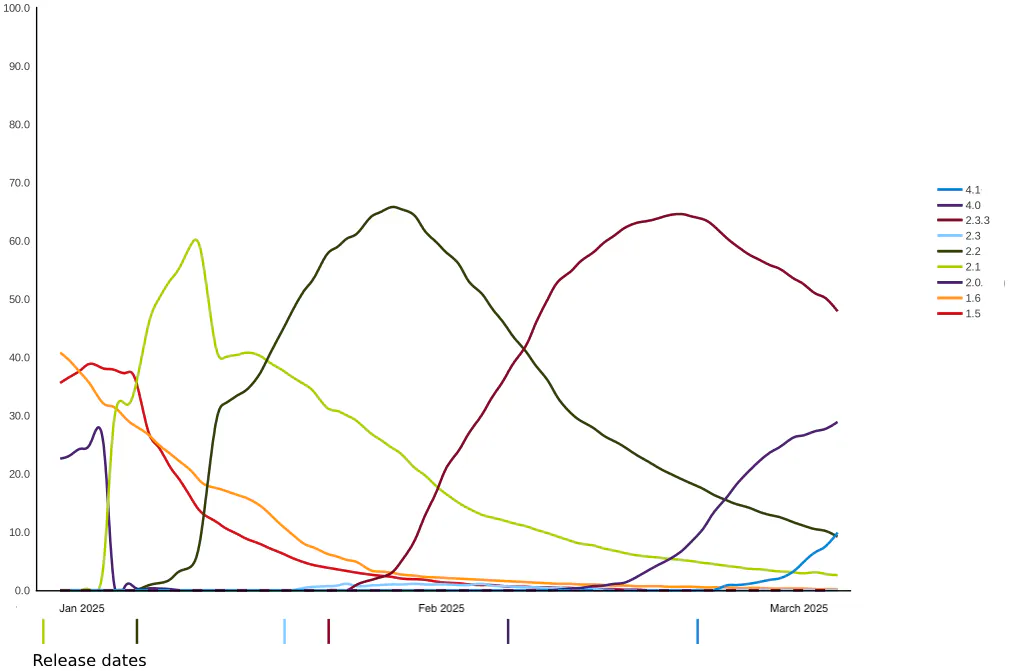
Consequently, a new app version's full rollout can take anywhere from a few days to several weeks. This extended rollout period is exacerbated by the use of gradual rollout features in the App and Play Stores, leading to a persistent operational challenge: multiple versions of the app are concurrently in use by the user base. As a React Native engineer, I have frequently observed this fragmented landscape.
The Challenge: When Breaking Changes Hit
This hard to control version spread becomes an issue when a new feature, API or infrastructure change introduces a breaking change, a modification that a previous version of the app simply cannot handle (e.g., an API endpoint removal or a critical security update).
Backend Complexity: When a breaking change is released, your backend APIs are forced to maintain support for every version that is being used on any device, including for users that have chosen to not enable auto-updates. This exponentially increases complexity, slows development, and introduces maintenance overhead.
Vulnerability to Bad Releases: If a critical issue or bad release slips through, the inability to immediately force all users onto a fix leaves a large portion of your user base exposed until their device eventually performs the update.
The Inevitability of a Forced Update: To resolve the risk and complexity of breaking changes, a team must eventually mandate an update. The question is not if you will force an update, but how effectively and granularly you can do it.
The Initial Solution: Simple Forced App Updates
The foundational step to manage this risk is implementing a simple Forced App Update mechanism. You've probably come across these in various applications, particularly in sectors where strict compliance is essential, like financial apps.
Upon launch, the mobile application checks a static, known source (such as a CDN file or a simple API) to determine the minimum supported version. For instance, the app queries, "What is the minimum version required?" and receives the response, "Version 1.5.1."
If the app detects a version mismatch (e.g., it is running 1.5.0), it displays a mandatory update screen, blocking access to prevent interaction with the now-incompatible or vulnerable backend.
While this is a necessary safeguard against critical breakage, this simple check is a blunt instrument that lacks the nuance required for modern app management.
The existing app-based version checking logic can only provide a simple "Yes/No" answer to the question of whether a forced update is necessary. This limitation often results in an unnecessarily large number of users being forced to update, even when the critical need only applies to a small subset.
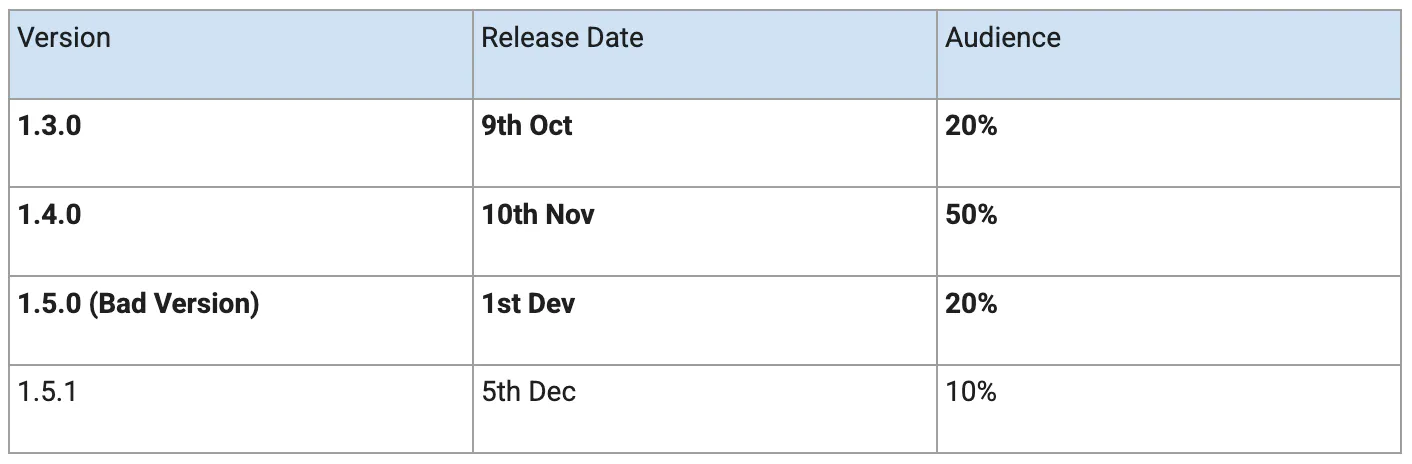
For example, consider the audience spread below. If a critical bug in version 1.5.0 necessitated making version 1.5.1 the minimum supported version, the forced update would impact the 20% of users on 1.5.0. However, it would also unnecessarily force an update on the 70% of users running older, but otherwise functional, versions of the app.
A forced app update disrupts the user experience. By blocking users from their intended task and requiring them to download a new version, it creates an immediate inconvenience. This is especially frustrating for those facing slow or costly internet connections.
A Better Solution: Server-Controlled Updates for Precision Control
The key to a truly effective update strategy is migrating the decision-making authority to the backend with Server-Controlled Forced App Updates. The app simply asks the server, "I'm 1.5.0. Do I need to update?"
The server now uses dynamic, contextual data to make a surgical decision:
Critical Fixes: Only app versions requiring a critical fix are subjected to a forced server update. This prevents unnecessary inconvenience for users on other versions who do not need to update.
API Version Dependency: The server can force an update not just on the app's version, but on the specific API version the app is consuming. If the app is using API v22, and that version is being retired as part of your deprecation strategy, the server responds, "That version is not supported. Update!" Robust API versioning is therefore essential.
Granular Targeting: The server is capable of employing sophisticated logic to determine precisely when and for whom an update is required by inspecting request headers.
OTA updates: An Alternative Solution?
React Native applications frequently leverage Over-The-Air (OTA) updates to quickly roll out new features. This method bypasses the standard App Store or Play Store submission process for minor changes, as updates to the JavaScript codebase can be deployed independently of a full app release.
However, the necessity of a mechanism to mandate full app updates remains. OTA updates rely on compatibility with specific native app versions. In dynamic development environments, it is common for a user base to be concurrently running multiple different native app versions, which poses a challenge for maintaining update consistency.
Potential issues with this approach
This method relies on the app making a network request during launch to check for a mandatory update. Consequently, users with no or slow network connectivity may face issues.
However, for many applications, this network dependency isn't a significant problem, as network access is already essential for core functions like fetching user profiles, cart contents, or home screen data. This server-controlled update process may not be suitable for apps that do not typically require network connectivity.
A crucial consideration is the speed of the network request that determines if a forced update is necessary. Standard optimisations such as caching, database efficiency, and using Content Delivery Networks (CDNs) should be implemented to ensure a fast response time.
Summary
An optimal update strategy must actively manage the inherent risk of multiple versions and breaking changes:
Servers should control forced update logic for precise targeting.
API Versioning simplifies version control and backend deprecation strategy.
Implement an In-App Update UI for a smooth, controlled user experience during mandatory updates.